
Tour
Prevail Desktop is the native app — a private, local-first life-OS for macOS and Windows. It bundles the engine, so there’s nothing to wire up: download, launch, and you’re in. Built with Tauri 2, React 19, and Tailwind 4.
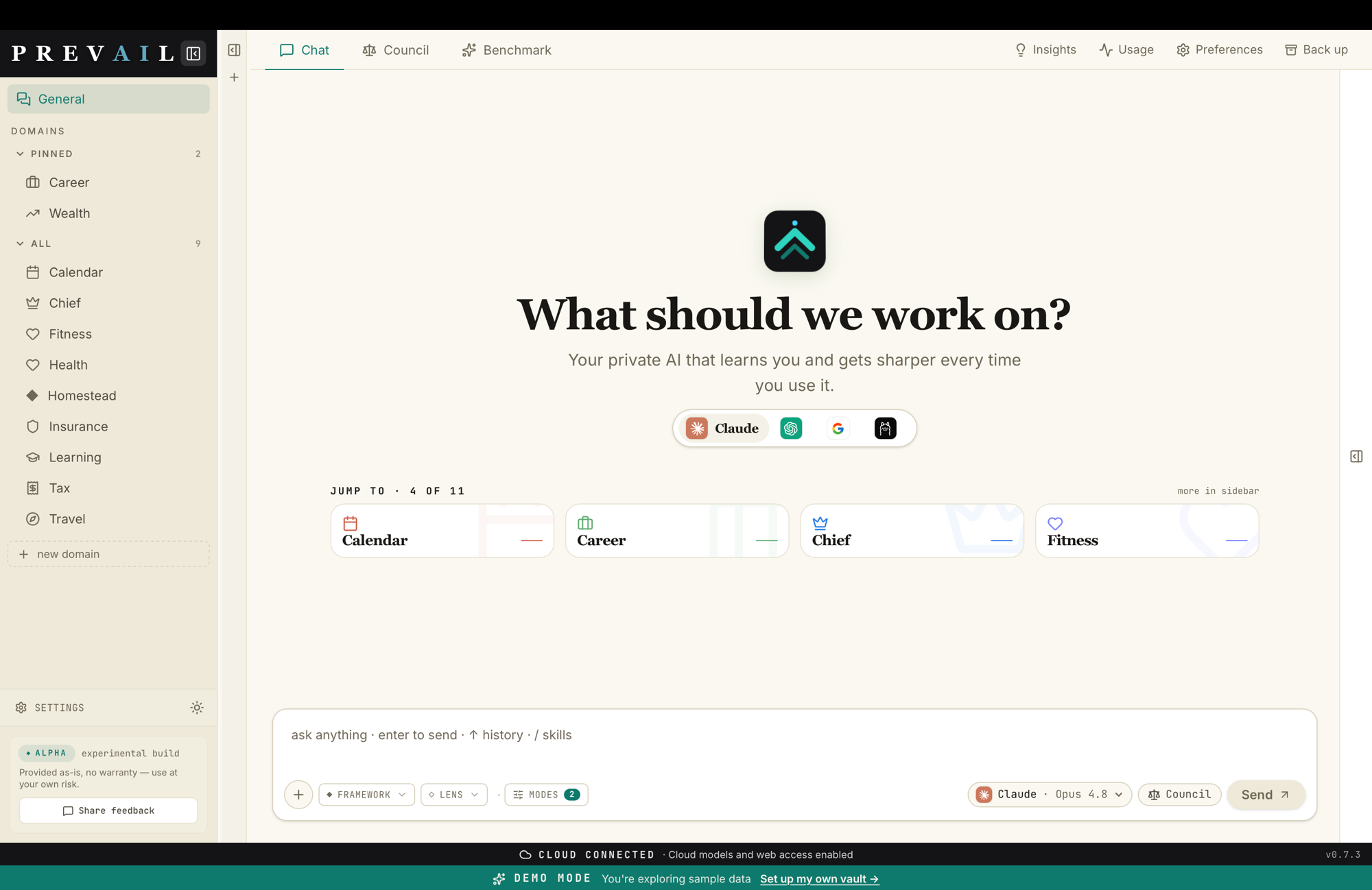
The layout
Section titled “The layout”| Area | What it is |
|---|---|
| Domain sidebar | Every life-domain in your vault, pinned ones up top. + new domain adds one. |
| Header tabs | Chat · Council · Benchmark — the three working surfaces. |
| Top-right | Insights, Usage, Preferences, and Back up. |
| Input bar | Your prompt, a framework/lens picker, and the model selector (single model or Council). |
| Status bar | Connection state and a demo-mode banner with a one-click “set up your own vault.” |
What it does
Section titled “What it does” Chat, domains & council Domain-grounded chat with any model, and the council with a chair-synthesized verdict.
Models & providers Installed CLIs (Claude, Codex, Antigravity, Ollama) or 200+ models via OpenRouter.
Memory & self-learning Every chat becomes a durable intent and per-domain memory that's read back next time.
Demo mode & starter packs Explore a pre-loaded household, then import a domain set for your situation.
The benchmark viewer Run and read scored benchmarks to see which model serves your decisions best.
Settings & integrations Models, memory, safety, gateway, MCP, providers, remote — everything in one place.
Local-first by default
Section titled “Local-first by default”Your vault, your chats, and the durable intent ledger stay on your machine. Nothing leaves unless you turn on an integration (a cloud model, the Telegram bridge, the WebUI). Secrets live in the system Keychain, not in the vault. Telemetry is off unless you explicitly opt in.
→ Privacy & local-first · Security & threat model
How it’s built
Section titled “How it’s built”- Frontend: Vite + React 19 + Tailwind 4. Talks to the backend only through a single bridge (
bridge.ts) — Tauri IPC on desktop, HTTP/SSE in the browser (so the same UI can be served to your phone). - Backend (Rust): Tauri 2 — the engine seam, the distillation daemon (self-learning), the Telegram and WebUI bridges, and ingestion/MCP.
- Bundled engine: the
prevailCLI ships as a TauriexternalBinsidecar, so the install is fully self-contained — no separate download, no daemon, no Docker.
Get it
Section titled “Get it”Download for macOS or Windows — signed, notarized, and self-updating. Then take the quickstart.